
Baby Night Light (Non-Profit)
Matthias KollmerParenting
4.433.00 Reviews
- Version
- Varies With Device
- Installs
- 100.00K
- Age Rating
- Everyone
Screenshots
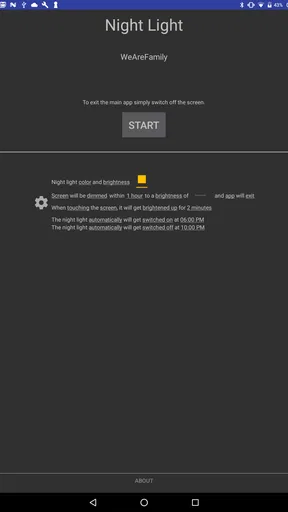
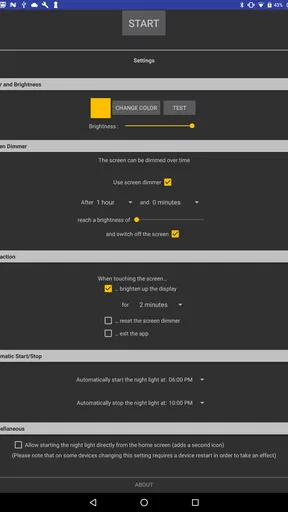

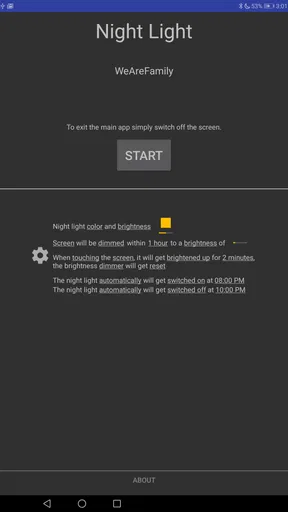
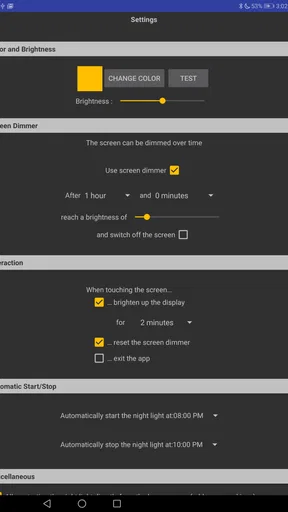

Our Review of Baby Night Light (Non-Profit)
 Analysis by Appyee
I tend to be skeptical of apps that promise to turn a phone into something as simple as a night light. A dedicated lamp usually feels safer, more dependable, and less distracting. After spending time with Baby Night Light, however, I found a useful little exception: it makes an Android phone or tablet available for a quiet bedtime task without asking parents to buy another device. My overall view is straightforward: this is a practical backup light and a convenient short-term nursery aid, but it is not a complete replacement for a purpose-built baby lamp.
The app sits in the parenting category and is developed by Matthias Kollmer. It is free to use, rated for Everyone, and has passed the point where it feels like an obscure experiment, with over one hundred thousand installs. Its average score is 4.4 from several hundred ratings, which matches my impression that the idea is simple but useful when the situation is right. The key is to understand what kind of problem it solves: not sleep training, not monitoring, and not soothing through sound, but providing gentle illumination from hardware you may already have nearby.
How it works in everyday parenting situations
The most convincing use case is the middle-of-the-night check. Imagine hearing your child stir and needing enough light to find a dropped pacifier, check a blanket, or walk across the room without switching on the main ceiling light. A phone or tablet running this app can fill that narrow role. It avoids the harshness of a bright room light and is less awkward than searching for a torch while holding a baby.
I also see value during travel. Families often arrive at a hotel, rental apartment, or relative’s home without the familiar nursery lamp. Packing a separate light is easy to forget, while an Android phone is usually already in a parent’s bag. In that situation, the app is not competing with a carefully chosen nursery product; it is solving the “we need a soft light tonight” problem with almost no preparation.
There is another small but worthwhile scenario: a parent may want to sit beside a sleeping child while preparing a bottle or organizing clothes. A phone placed at a sensible distance can provide enough visibility without flooding the room. That makes the app more useful than a basic flashlight for quiet tasks, since a standard flashlight is generally designed to project a strong, concentrated beam rather than create a calmer atmosphere.
That said, I would not treat the phone as part of the baby’s sleep environment. I would keep it on a stable surface, away from the crib, and positioned so the display is not shining directly into the child’s eyes. The app can provide light, but safe placement still depends entirely on the adult using it. This distinction matters: the software may be convenient, but it cannot make an unstable phone placement safe.
The strongest part is its low-friction purpose
The best thing about this app is that it focuses on one ordinary need instead of trying to become a complete parenting dashboard. There is no reason to learn a complicated workflow when the goal is simply to create a visible, gentle glow. I appreciate tools that stay close to the moment they are meant to help with, especially at night when a parent is tired and does not want to navigate a crowded interface.
Its free availability also changes the decision. A dedicated night light may still be the better long-term purchase, but a free app lets a parent test the idea immediately. It is particularly sensible for occasional use: overnight trips, temporary sleeping arrangements, or a child who only sometimes needs a little light. In those cases, buying another gadget may feel unnecessary.
The app’s age rating of Everyone is reassuring for the broad audience, but parents should not confuse an age classification with a safety certification for nursery equipment. The rating describes who can use the software; it does not turn a smartphone into a child-safe appliance. I would still supervise how and where the device is used, just as I would with any electronic object placed near a sleeping area.
One practical tip is to prepare the phone before bedtime rather than configuring it during a wake-up. Set the device where you can reach it, make sure it has enough charge, and avoid leaving unrelated notifications or distracting content open. The value of a night-light app disappears if finding it wakes you fully or if the phone becomes an invitation to check messages. Used as a dedicated tool for the moment, it is much more effective than used as a general phone beside the bed.
Where it compares well with ordinary alternatives
Compared with a ceiling lamp, the app is much less disruptive. A ceiling light illuminates the entire room and can make it harder for everyone to settle again. Compared with a flashlight, a screen-based light can feel less clinical and may be easier to position for a broad patch of visibility. Compared with buying a separate lamp, it costs nothing and travels with hardware many parents already own.
Those advantages are strongest when the need is temporary. If I were staying somewhere for one night, I would happily use the app instead of packing a lamp. If I were setting up a permanent nursery, I would choose a dedicated light with a stable base and controls designed for repeated nighttime use. The app wins on availability and flexibility; the physical lamp wins on readiness and separation from the phone.
That separation is more important than it first appears. A phone can bring calls, alerts, social media, and bright content into the bedroom. Even if the app itself is calm, the device remains a multipurpose screen. A dedicated night light does not tempt a tired parent to scroll while waiting for a child to settle. For families trying to keep phones out of the bedtime routine, the usual alternative may be healthier and more consistent.
There is also a difference in reliability. A physical lamp is normally ready whenever its switch is pressed, while a phone may be charging elsewhere, nearly empty, locked, or needed for an emergency call. I would never make the app the only source of light in a situation where dependable illumination matters. It is best understood as an available option, not essential household equipment.
The limitations parents should take seriously
The main weakness is built into the concept: the light comes from a phone or tablet. That means the experience depends on the device’s screen, battery condition, brightness behavior, and placement. Those variables are outside the app’s control. Two families can use the same software and have noticeably different results because their devices have different screen sizes or display characteristics.
A phone screen is also limited in scale. It may be perfectly adequate for checking a cot or finding something beside the bed, but it will not necessarily illuminate a whole room evenly. If you need to move around while carrying a child, prepare medication, or deal with a spill, a proper lamp or room light may be more suitable. I would avoid assuming that a soft-looking screen automatically provides enough visibility for every task.
Another point of friction is device availability. Parents often keep their phone close for calls, alarms, or monitoring responsibilities. Using it as a light may mean giving up access to those functions or placing the phone somewhere less convenient. A spare tablet can be a better fit, provided it can be positioned securely and has sufficient power. The app’s usefulness therefore depends on whether you have a suitable Android device that can be left in place.
Heat and charging habits deserve common-sense attention too. I would not cover the device with bedding, place it against soft materials, or leave it somewhere a child can grab it. If the phone needs charging, the cable should be arranged so it cannot become a hazard. These are not flaws unique to this app, but they are reasons not to treat a phone-based night light exactly like a purpose-built nursery product.
I also would not expect it to solve a child’s difficulty settling. Light can make nighttime care easier, but it does not replace a routine, a comforting voice, or a parent’s presence. If a child needs a predictable color, timer, audio, remote control, or a physical switch that can be found without looking at a screen, another product may be a better match. Baby Night Light is strongest when the requirement is modest and immediate.
Small workflows that make it more useful
My preferred workflow is to dedicate an older Android phone or tablet to occasional bedside use rather than relying on the parent’s primary phone every night. This reduces interruptions and makes the device easier to position. It also prevents the light from becoming mixed with work messages or entertainment. The app itself remains simple, but the surrounding setup determines whether it feels calm or inconvenient.
For travel, I would test the arrangement before the child goes to sleep. Place the device on a stable table, check whether the light reaches the area you actually need, and make sure the screen remains visible from the parent’s side of the room. This quick test can reveal problems that are not obvious when the room is bright, such as glare on a wall or a position that requires walking too close to the crib.
A useful trade-off is brightness versus disturbance. More light makes nighttime care easier, but it can also be more noticeable to a sleeping child and more stimulating for the adult. I would start with the lowest useful setting and increase it only when necessary. The goal is not to make the room bright; it is to create a small working area for a specific task.
For families with more than one child, a tablet may offer a broader visible surface than a phone, but its larger size can make placement more demanding. A phone is easier to carry and store, while a tablet may be more noticeable in a dark room. Neither is automatically better. I would choose based on the room, the distance from the sleeping area, and whether the device can remain completely out of reach.
One habit I would avoid is leaving the app running indefinitely just because it is convenient. If the child is asleep and no light is needed, turning the device off or returning it to normal use reduces battery drain and removes an unnecessary screen from the room. The app works best as an on-demand tool, not as something that must remain active through every night.
Who should use it, and who should skip it
I think it is a good fit for parents who want a free, immediate solution and already have an Android phone or tablet that can be positioned safely. It is especially appealing for occasional nighttime checks, travel, temporary bedrooms, and households that do not want to purchase a separate lamp yet. It can also suit older children who need a little light for a brief bedtime task rather than a permanent fixture.
I would recommend looking elsewhere if you want a dedicated nursery setup that is always ready, physically stable, and separate from a personal phone. The same applies if you need a light that covers a large room, offers specialized controls, or can be operated without handling a device. In those cases, a conventional night light is not merely more polished; it is better aligned with the job.
Parents who are especially concerned about screens near sleep should also think carefully. Even a light-focused app does not change the nature of the hardware. If using a phone beside the bed encourages late-night checking, the convenience may come with a behavioral cost. A basic plug-in lamp may be the wiser choice for a calmer household routine.
The developer, Matthias Kollmer, has kept the concept narrow enough that the app is easy to understand. Its store short description, “Baby Night Light,” says very little, but the simplicity is part of the appeal: this is not pretending to monitor a child or replace parental attention. With a 4.4 average from 463 ratings and 33 reviews, it has earned a generally positive reception, while its free price makes trying it a low-risk decision.
My final view after using it
Baby Night Light is a useful emergency and travel companion, not a complete nursery solution. I like it because it turns a device many parents already carry into a small source of bedtime illumination, and because it avoids the cost and storage of another gadget. Its strongest moments are practical rather than dramatic: finding a pacifier, checking a blanket, or moving through a dark room without waking everyone.
Its weaknesses are equally clear. The phone must be charged and placed carefully, the light may not cover enough space for demanding tasks, and the device can bring distractions into a routine that benefits from fewer screens. Those limitations do not ruin the app; they define the circumstances in which it makes sense.
Released on June 21, 2019, it remains a straightforward parenting app rather than an ambitious all-in-one product. I would install it as a backup, keep it ready for travel, and use it when a dedicated lamp is unavailable. I would not rely on it as the only nighttime light in a nursery or expect it to provide the specialized comfort features of a purpose-built alternative.
For a parent asking whether it is worth trying, my answer is yes, provided the expectations stay modest. It is free, accessible, and genuinely handy in the right moment. Just treat the phone as a carefully placed light source, not as a toy, monitor, or permanent fixture beside the child. That balanced approach is where this small app delivers its real value.
Verdict
Strengths of Baby Night Light (Non-Profit)
- Soft, calming light helps create a reassuring bedtime environment.
- Simple controls make it easy for children and parents to use.
- Non-profit approach may appeal to users seeking a purpose-driven app.
- Lightweight design is unlikely to consume much storage space.
- Useful as a gentle night-light during nighttime checks or feeding.
Limitations of Baby Night Light (Non-Profit)
- Limited customization may not satisfy users wanting many colors or effects.
- Extended screen use can still affect sleep if brightness is set too high.
- May be less effective in brightly lit rooms.
- Requires a compatible device with a functioning display.
- Keeping the phone active overnight may use extra battery power.
Similar Picks in This Category
View All
Family Space
Motorola Mobility LLC.3.9

شرطة الأطفال - مكالمة وهمية
Oub Apps4.1

Findmykids: Parental Control
LETEM LTD4.6

Pregnancy + | Tracker App
Philips Electronics UK Limited4.8

Policía de niños - para padres
Kids police4.7

Pregnancy App
Amila4.9
Frequently Asked Questions
What is Baby Night Light (Non-Profit), and what is it designed for?
Baby Night Light (Non-Profit) is a simple nighttime companion designed to provide a gentle glow for babies, toddlers, and parents. It can help create a calmer atmosphere during bedtime, nighttime feeding, diaper changes, or checking on a child without turning on a bright room light. Its non-profit nature generally suggests a straightforward experience focused on usefulness rather than aggressive monetization, although the exact features may vary by version and device.
Is Baby Night Light (Non-Profit) safe to use near a baby while sleeping?
The app can be useful as a soft-light aid, but parents should still use it responsibly. Keep the phone or tablet on a stable surface away from the child’s reach, avoid placing it inside a crib, and make sure the device does not become hot or block ventilation. Bright screens may disturb sleep, so choose the lowest comfortable brightness and avoid using the device as a substitute for proper adult supervision or safe-sleep practices.
Does Baby Night Light (Non-Profit) work without an internet connection?
A basic night-light application will usually work offline once it has been installed, since displaying a color or glow does not normally require an internet connection. This makes it convenient for bedrooms, travel, or places with limited connectivity. However, certain optional features, updates, advertisements, analytics, or external links may require internet access, so it is worth checking the app’s permissions and testing the main function before relying on it at bedtime.
Does Baby Night Light (Non-Profit) drain the battery or make the phone warm?
Like any application that keeps the screen illuminated, Baby Night Light (Non-Profit) can consume noticeable battery power, especially when used for several hours. Battery use depends on screen brightness, display technology, device age, and whether sound or other features are active. Before leaving it running overnight, use a reliable charger, keep the device on a hard ventilated surface, and stop using it if it becomes unusually warm.
Is Baby Night Light (Non-Profit) free, and are there advertisements or in-app purchases?
The “Non-Profit” name indicates that the app is intended to be offered without a conventional commercial focus, but users should still confirm the current store listing before downloading. Pricing, advertising, donations, permissions, and optional purchases can change between releases or platforms. Review the Google Play or App Store details carefully, particularly the data-safety section, supported devices, and any notes explaining how the project is funded.
